Canon EOS R8 II Full Frame Mirrorless Camera
- Full-frame CMOS Sensor with 24.2 Megapixel resolution
- In-Body Image Stabilization (IBIS) with 7.5 stops of coordinated IS correction at image center
- New compact and ergonomic design - the lightest IBIS-equipped camera in the EOS lineup
- Dual Pixel CMOS AF II autofocus with People, Animal and Vehicle detection
- Register People Priority Autofocus
- New Multi-controller joystick
- 40 fps electronic shutter with pre-continuous recording
- 30% increase in continuous RAW shots, and a 58% increase in continuous JPEG shots vs. the original EOS R8
- 16 Color Filters including new Positive Filmtone and Negative Filmtone
- A+ Scene Intelligent Automatic Mode and 14 different SCN Modes
- UHD 4K 60p and Full HD 180p video
- AF for close-up demos / SCN mode Movie for close-up demo
- Slow and fast mode recording
- Custom Picture mode with Canon Log 3
- Electronic Viewfinder (EVF), Vari-angle LCD and Tally lamp
- Wi-Fi 2.4/5.0 GHz and Bluetooth 5.3 connectivity
- USB-C for Livestreaming and charging
Created to Explore
A compact and lightweight full-frame camera that packs advanced, high-end performance and in-body image stabilization into a highly portable design.
Geared toward aspiring photographers and enthusiasts, the EOS R8 Mark II features a 24.2-megapixel full-frame CMOS image sensor that delivers rich tones, natural bokeh, and high-ISO performance with low digital noise. Its premium, modern flat-surface design breaks from recent curved models to touch upon the heritage of the days of more angular bodies like the Canon T80, F-1 and A-1 cameras offering ergonomic comfort in a travel-ready body. The EOS R8 Mark II stands out as the lightest camera in the EOS lineup to feature In-Body Image Stabilization (IBIS), providing up to 7.5 stops of coordinated shake correction at the center so you can shoot sharp, steady images even while on the go.
Beyond stunning stills, the EOS R8 Mark II provides everything a hybrid photographer would need, offering breathtaking 6K-oversampled UHD 4K video at 60p and Full HD video at up to 180p. You can effortlessly capture fast-moving action with advanced Dual Pixel CMOS AF II, which features automatic detection for people, animals, and vehicles, alongside a highly precise Register People Priority function. To ensure you never miss a fleeting moment, the camera boasts a blazing-fast electronic shutter capable of up to 40 frames per second, complete with a pre-continuous shooting feature that captures up to 20 shots a half-second before you even fully press the shutter.
Benefits of a Full-Frame Sensor
24.2 Megapixel Image Sensor
Precision and control without a full crew.
Full-frame Boke
h The large sensor area allows creators to beautifully blur both foregrounds and backgrounds.
Low-Light Performance
This sensor offers approximately 2.5 times the light-gathering area of an APS-C sensor for beautifully lit photos even when light is scarce.
Maximize Your Lens' Potential
Take full advantage of the expansive perspective of wide and ultra-wide angle lenses with the extensive RF Lens line-up.
Experience the power of 5-axis image stabilization, seamlessly built into Canon's lightest full-frame camera yet. Whether you are dragging your shutter speed for slow exposures, using a non-stabilized lens, or capturing smooth video on the move, this advanced system lets you push your creative limits. Regardless of whether your lens has built-in optical stabilization, the camera's IBIS unit seamlessly combines with the lens to provide optimized, coordinated protection against shake from wide-angle perspectives all the way to telephoto focal lengths, delivering up to 7.5 stops of coordinated shake correction at the center and 7.0 stops at the periphery for still images.
100% Area Coverage
Capture every moment with confidence. The Dual Pixel CMOS AF II system provides 100% frame coverage, tracking moving subjects anywhere in the shot for crisp, razor-sharp focus.
Register People Priority
A standout feature is the Register People Priority autofocus function, allowing you to lock onto specifically registered and prioritized individuals over other subjects in the scene.
People Detection
The People detection feature can prioritize the subject's upper torso, head, face, left or right eye, or automatically select the eye closest to the camera.
Animals
The Animal detection feature is specifically designed to recognize dogs, cats, birds, and horses, automatically prioritizing focus on their eyes, face, or entire body.
Vehicles
The Vehicle detection feature is specifically built to recognize motorsports cars, motorcycles, aircraft, and trains, with a spot detection option that can focus on driver/rider helmets or vehicle cockpits.
Multi-controller Joystick
Operational control is significantly enhanced by the inclusion of the Multi-controller joystick, allowing you to ergonomically navigate around the screen.
Ready for the Unpredictable
When action strikes, the electronic shutter mode provides continuous shooting at up to 40 frames per second and includes a powerful pre-continuous shooting function that allows you to capture up to 20 images before the shutter button is fully depressed.
Improved Burst Rates
When shooting at 40-frames per second, there is a 58% increase in uninterrupted, JPEG shots over the original EOS R8 camera, and a 30% increase when shooting RAW images, as well.
Express Yourself
Color Filters
16 color filters allow you to apply creative visual styling to your photos and videos according to your scene preference, such as applying the Story Teal & Orange filter, which biases the overall image towards teal shadows and orange highlights, which works well on high-contrast daytime scenes.
Positive Filmtone
Applies a deep color tone to recreate the brilliant, high-contrast finish of classic positive slide film.
Negative Filmtone
Designed to digitally recreate the nostalgic, evocative aesthetic of classic analog film directly in-camera.
Advanced A+
Automatically recognizes the shooting scene and performs intelligent bracketing and advanced image processing for an optimal image.
Creative Bracketing
Multiple images are captured per shot besides the normal image, each with characteristics such as brightness and color tone automatically changed.
14 SCN Modes
The SCN (Special Scene) position on the camera's mode dial provides automated presets tailored for specific environments, such as smoothing skin for flattering portraits or Handheld Night Scene, which helps capture stable night shots without a tripod while also giving you the option to tint your image in-camera.
See it All
You may prefer the focused experience of the viewfinder, and other times you may find the compositional freedom of the vari-angle LCD more appealing to easily capture subjects at various angles. With the EOS R8 Mark II camera, you have both for maximum versatility for creativity.
Video Performance
Full-width 4K 60p/Full HD 180p
Videographers can capture uncropped high-resolution footage in UHD 4K at up to 60p, or shoot Full HD video at up to 180p.
See it All
For video product showcases, livestreams, and reviews, there is a dedicated autofocus setting for creative zone shooting, and an automatic exposure SCN movie mode tailored specifically for close-up demonstrations.
Slow & Fast Mode
Easily capture slow-motion details or fast motion time-lapses in-camera with control over the playback speed, for a truly mobile workflow without needing complex post-production.
Make the Grade
Advanced color grading is possible thanks to the Custom Picture mode, which provides Canon Log 3 with up to 14 stops of dynamic range, HDR video options like PQ and HLG, and two different 709 options including Canon 709 and BT.709 Standard.
Additional Features
Tally Lamp
The camera's red tally lamp is positioned to be easily visible from the subject side to indicate that movie recording is in progress.
EVF
The electronic viewfinder provides a more traditional experience in a modern way with an OLED screen, approximately 2.36 million dots of resolution, 100% frame coverage, and 0.70x magnification.
USB-C
The camera's USB-C port provides a stable connection for USB Streaming UVC/UAC, and the USB-C port can even be used to charge the camera battery.
Dual Pixel 3D Converter
Dual Pixel 3D Converter is a new software coming in October for compatible EOS R-series cameras like the EOS R8 Mark II, and allows users to quickly convert a single 2D photo into a realistic 3D model or video using depth data from the camera's image sensor instead of complex scanning equipment.
Technical Specifications
Type
- Type: Full-frame, mirrorless interchangeable lens camera
- Image Processor: (one) DIGIC X
- Recording Media: (one) SDXC / SDHC / SD card; UHS-II compatible • Eye-Fi and MultiMedia Cards (MMC) not compatible
- Compatible Lenses:
- Canon RF and RF-S lenses
- Canon EF, EF-S and TS-E lenses (with optional Mount Adapter EF–EOS R)
- Lens Mount: Canon RF mount
Image Sensor
- Type: Canon full-frame CMOS sensor (compatible with Dual Pixel CMOS AF)
- Effective Pixels: Approx. 24.2 million pixels
- Pixel Size: Approx. 6.0 microns square
- Total Pixels: 25.6 million pixels
- Aspect Ratio: 3:2 (Horizontal : Vertical)
- Color Filter System: RGB primary colors
- Low-pass Filter: Installed at front of sensor; non-removable
- Dust Deletion Feature (Self Cleaning Sensor Unit)
- Auto cleaning: at Power Off / Enable (at power On – Off) / Disable
- Clean now (user-activated cleaning)
- Clean manually (shutter blades held open for user cleaning of sensor)
Recording System
- Recording Format: DCIF (Design rule for Camera File system 2.0; EXIF 3.0
- Image Format:
- Still image format:
- RAW: Canon RAW / C-RAW (.CR3)
- JPEG / HEIF: L / M / S1 / S2
- Movie image format (user-selectable in red Shooting Menu):
- XF-HEVC S — YCC 422 10-bit
- XF-HEVC S — YCC 420 10-bit
- XF-AVC S — YCC 422 10-bit
- XF-AVC S — YCC 420 8-bit
- Folder:
- Automatically created when card is inserted
- DCIM / XFVC / MISC folders
- Folder Actions: Select folder / Create folder (new folder name can be user-changed)
Folder Name
- Still Images:
- DCF standards compliant
- Default (within DCIM folder) — xxx_R8M2
- Can be changed by user to any 5-character string
- Movies:
- XFVC folder: XF-HEVC S / XF-AVC S file formats
- REEL_xxxx (MP4 video file in XFVC folder)
- News Metadata: Not supported
White Balance
- Settings:
- Auto (AWB); includes Ambiance priority / White priority
- Daylight
- Shade
- Cloudy
- Tungsten light
- White fluorescent light
- Flash
- Custom WB
- Color Temp (four manual user pre-sets available: K1 – K4)
- White Balance Shift:
- Shift Blue / Amber bias: ±9 levels
- Magenta / Green bias: ±9 levels
- Blue/amber and magenta/green shift can be combined
- WB Bracketing available: ±3 levels
Viewfinder
- Type: OLED electronic eye-level viewfinder • OLED screen size — approx. 0.39 inch
- Viewfinder resolution: Approx. 2.36 million dots
- Magnification: Approx. 0.70x
- Eyepoint: Approx. 22mm (at -1m-1 from eyepiece lens)
- Dioptric adjustment: Approx. -4.0 – +1.0 (user-adjustable)
- Viewfinder brightness: Auto (adjusts automatically to suit metering results): Manual (adjustable in 5 steps, in yellow Set-up Menu)
- Display simulation (Viewfinder & LCD screen):
- Exposure simulation + Depth-of-field
- Exposure simulation
- Exposure simulation only when DOF preview pressed
- Disable (displays adjust for proper viewing, regardless of actual exposure)
- Optical Viewfinder Simulation:
- (EVF and LCD screen) — On / Off
- Display adjusts to reduce contrast and improve light/dark details
- Display does not reflect actual exposure, and various camera settings such as Picture Style, WB, HDR PQ, etc.
- HDR / C.Log View Assist (Viewfinder & LCD screen): Available during HDR PQ, or when Canon Log 3 / PQ / HLG is set in Custom Picture settings
LCD Screen
T
- ype: TFT color, liquid-crystal monitor
- Size: 3.0 inch (3:2 aspect ratio); diagonal approx. 2.95 in. / 7.5 cm
- Resolution: Approx. 1.62 million dots
- Touch-screen Operation: Yes (capacitive sensing)
- Vari-Angle Adjustment:
- Opening angle: approx. 0–175°
- Rotating angle: forward — approx. 0–90° / backward — approx. 0–180°
- Coatings: Anti-smudge coating (anti-reflection coating not applied)
Playback
- Magnified View (still images): 1.5x – 10x
- AF Point Display (still images): Available
- Highlight Alert: Available (blinking highlights, during single-image display)
- Auto Rotate: On (display + computer) / On (computer only) / Off • Video: via Change movie rotation information
- Search: By Rating / Date / Folder / Protection / Type of file (1) / Type of file (2) • [Protect when setting the rating] can be set.
- Ratings (Star): Off / Star ratings 1–5
- Protect Images: Select images / Select range / All images in folder / Unprotect all images in folder / Unprotect all images on card / All found images / Unprotect all found images / All images on card
- Image Copy (to card on camera): Not Available
Autofocus
- Focus Type: Dual Pixel CMOS AF (from CMOS imaging sensor)
- AF Zones for Auto Selection:
- Still images: max. 1,053 zones
- Movies: max. 1,053 zones (when 4K is active) • With focusing area approx. 100% x 100%
- Selectable AF Point Positions:
- Still images: max. 4,368 positions (78x56)
- Movies: max. 3,588 positions (78x46) • User-adjustable AF point positioning over approx. 90% (H) x 100% (V)
- AF Brightness Range:
- Still images: EV -7.5 – 21
- Movies: EV -5.5 – 21 (Full HD: EV -5.0 – 21) • With f/1.2 lens (except DS lenses); center AF point; One-shot AF; ISO 100
- AF Areas:
- Spot AF
- 1-point AF
- Expand AF (4-point expansion)
- Expand AF (8-point expansion)
- Flexible Zone AF 1
- Flexible Zone AF 2
- Flexible Zone AF 3
- Whole Area AF
- AF Subject Detection:
- Auto
- People
- Animals (dogs / cats / birds / horses)
- Vehicles (motorsports cars & motorcycles / aircraft / trains)
- Certain types of animals or vehicles may not be detectable
- Register People Priority available, for up to ten human subjects
- Eye Detect AF:
- Auto (camera selects most prominent eye for focusing)
- Right Eye (prioritizes subject's right eye)
- Left Eye (prioritizes subject's left eye)
- Disable
- Defocus (video only):
- (via user-customized button) Intentional shift of focus from sharp original subject to a de-focused, blurred state
- Available in AF mode only; [Movie Servo AF] will be paused
- Blur amount user-selectable during defocus (1 – 5)
- AF speed during defocus user-selectable (1 – 10)
- Defocus effects may not be suitable, depending on lens, scene, and recording conditions
- AF-assist beam Built-in to camera: Compatible white LED AF-assist beams on Canon speedlites • Intermittent flash AF-assist beams and red AF-assist beams on speedlites not compatible
- Manual focus aids: Focus guide / MF Peaking
- Focus Bracketing:
- User-enabled
- 2 – 999 source images can be taken (user-defined in Menu)
- User selects Focus increment, from 1 (narrow) to 10 (wide)
- In-camera compositing of a finished JPEG image
- Source images can also be composited in Canon Digital Photo Professional software, or other compatible third-party software
- Electronic shutter only; flash not possible
Exposure Control
- Metering modes (stills):
- Evaluative metering (linked to active AF point / Area)
- Partial metering (approx. 5.9% of image area, at center of screen)
- Spot metering (approx. 3.0% of image area, at center of screen)
- Center-weighted average metering
- Partial and Spot metering: circle appears at center of LCD screen
- Spot metering cannot be linked to off-center AF point locations
- Metering modes (movies): Evaluative metering (only)
- Metering Range:
- (still images) EV -3–20
- (movies) EV -1–20
- Exposure Modes (stills):
- A+ (Scene Intelligent Auto)
- P (Program AE)
- Fv (Flexible-priority AE)
- Tv (Shutter-priority AE)
- Av (Aperture-priority AE)
- M (Manual exposure)
- C1 – C3 (Custom shooting modes)
- B (Bulb mode)
- S&F (Program AE) • Movie for close-up demos — reverts to Scene Intelligent Auto
- SCN (Special scene modes)
- SCN (Special Scene Modes, stills):
- Portrait
- Panning Close-up
- Group
- Photo
- Night Portrait
- Kids
- HDR Backlight Control
- Landscape
- Silent Shutter
- Sports
- Food
- Smooth skin
- Handheld Night Scene
- Panoramic shot
- Exposure Modes (movies):
- A+ (Scene Intelligent Auto movies)
- P (Movie auto exposure)
- Tv (Movie shutter-priority AE)
- Av (Movie aperture-priority AE)
- M (Movie manual exposure)
- Fv — reverts to movie auto exposure
- S&F (Slow and Fast — settable on LCD screen for P, Tv, Av, or M)
- C1 – C3 (movie Custom shooting modes)
- B — reverts to movie auto exposure
- SCN — Special scene modes
- SCN (Special Scene Modes, movies):
- Smooth Skin Movie
- Movie IS mode
- Movie for Close-up Demos
- ISO Speed Range (stills):
- Normal — ISO 100 – 102,400
- Expanded — ISO 50 – 204,800 (equivalent)
- Minimum ISO 200 when Highlight Tone Priority is active)
- ISO Speed Range (video):
- ISO 100 – 25,600
- ISO range varies, depending on Custom Picture and similar settings
- Expanded: max. ISO 102,400 for movies (varies, depending on settings)
- Auto ISO Range (stills): Minimum: L (ISO 50) or 100 – ISO 51,200 (expandable to ISO 102,400)
- Auto ISO Range (video): ISO 100 – 25,600 (expandable to ISO 102,400)
- Exposure Compensation: ±0.3 – 3 stops, in 1/3 or 1/2-stop increments
- Auto Exposure Bracketing: ±0.3 – 3 stops, in 1/3 or 1/2-stop increments
- (2, 3, 5, or 7 still image shots selectable)
- AE Lock:
- Applied automatically: AE is locked as soon as subjects are in focus using One-Shot AF when set to [C.Fn2: AE lock meter. mode after focus].
- Applied manually: Use the AE lock button (update by pressing the button again) in Fv, P, Tv, Av, and M modes. (Enabled in all metering modes.)
Shutter
- Type:
- Electronically controlled focal-plane shutter
- Rolling shutter, using CMOS image sensor
- Shutter Modes (stills):
- Electronic 1st-curtain
- Electronic shutter • Mechanical shutter not available
- Shutter speeds (stills):
- Electronic 1st-curtain: 1/4000 – 30 seconds, plus Bulb
- Electronic shutter: 1/16,000 – 30 seconds, plus Bulb
- 1/16,000 only available in Fv, Tv, or M modes
- Electronic shutter — up to 1/8000 in P or Av modes
- 1/16,000 cannot be adjusted in ⅓ or ½-stop increments
- Electronic shutter — max. 1/8000 in HDR mode, Focus Bracketing, or if same exposure for new aperture is active
- Flash sync speed:
- Electronic 1st-curtain only: max. 1/200 sec.
- 1/250 sec. With Sync Speed Priority active (Canon speedlites only)
- 1/250 sec. in 1.6x (crop) mode
- Flash not possible with Electronic shutter
- Self-timer: 10 sec. / 2 sec. / Continuous • Continuous self-timer: 2–9 shots fired continuously, after 10 sec. Delay
- Shutter type (movies): Rolling shutter, using CMOS image sensor
- Shutter speeds (movies):
- 1/8000 sec. – 1/8 sec. (slowest speed is based on movie FPS rate)
- 1/8 sec. minimum in Tv or M movie modes
- 1/25 sec. minimum in other movie shooting modes
- Shutter covers sensor: None, at shut-down
Drive Modes
- Drive modes (still images):
- Electronic 1st-curtain:
- High speed continuous + — 6 FPS*
- High speed continuous — 6 FPS
- Low speed continuous — 3.0 FPS
- Single shooting
- Electronic shutter:
- High speed continuous + — 40 FPS*
- High speed continuous — 20 FPS
- Low speed continuous — 5.0 FPS
- Single shooting
- Self-timer (10 sec. / 2 sec. / Continuous)
- *Maximum FPS continuous still-image shooting (Continuous H+ Drive mode) depends upon camera settings; in some shooting conditions (slow shutter speeds, etc.), maximum FPS may not be possible
- Pre-continuous shooting (still images):
- Records 20 shots (approx. 0.5 sec.) before shutter button fully pressed
- RAW, C-RAW, JPEG or HEIF images available
- Electronic shutter and Continuous H+ drive must be set by user
- Flash photography, AEB shooting, and some other functions not Available
- Burst rate (continuous still images until camera slows to write to SD card)
- RAW — 73 continuous images (40 FPS, Electronic shutter) — 1,000 or more (6 FPS, 1st-curtain Electronic shutter)
- Large/Fine JPEG — 190 continuous images (40 FPS, Elec shutter) — 1,000 or more (6 FPS, 1st-curtain Elec shutter)
Image Stabilization
- Still-image IS:
- In-body Image Stabilization (IBIS), using CMOS sensor
- Coordinated IS — combined IBIS + optical IS, with IS lenses
- Coordinated IS correction:
- Center — 7.5 stops; Peripheral — 7.0 stops (tests conforming to CIPA standards, using RF24-105mm F2.8 L IS USM Z lens)
- Movie Digital IS:
- 5-axis digital stabilization, at CMOS image sensor
- Independently activated (vs. IBIS); Coordinated IS available (Movie Digital IS + IBIS + lens optical IS, if available)
HDR shooting
- HDR shooting (PQ): Available
- Still images: 10-bit HEIF images; YCbCr 4:2:2; Rec. ITU-R BT-2100 (PQ)
- Video: Depends on recording format setting
- HDR Mode:
- Still images: Off / Moving subject / Dynamic range
- Moving subject HDR created from single exposure
- Dynamic range: Captures three source images; one finished JPEG image written to memory card (source images can be saved)
- Dynamic range source images: Auto / ±1 EV / ±2 EV / ±3 EV
- HDR Movie Mode: None (HDR PQ video is available)
Color Filters
- (still images and video):
- NegativeFilmtone
- PositiveFilmtone
- StoryTeal&Orange
- StoryMagenta
- StoryBlue
- PaleTeal&Orange
- RetroGreen
- Sepiatone
- AccentRed
- TastyWarm
- TastyCool
- BrightAmber
- BrightWhite
- ClearLightBlue
- ClearPurple
- ClearAmber
- Color Filter strength can be adjusted from 100% to 10%
- Not available for RAW or C-RAW still images, HDR (PQ), multiple exposures, or focus bracketing
- Cannot be set in Basic Zone exposure modes
- Movies: cannot be used with HDR (PQ) or Time-lapse movies
Video recording
- Maximum Recording:
- Times Less than 100.0 FPS: maximum 6 hours 00 minutes
- Over 100 FPS: maximum 2 hours 00 minutes
- Recording time can be shorter, from factors such as battery power or shut-down from heat
- Cooling Fan: None (no accessory cooling grip available)
- Overheating shut-down times (at 73°F / 23°C, internal and external temperatures):
- 4K at 29.97 FPS, Standard LGOP — no restrictions
- Full HD at 29.97 FPS, Standard LGOP — no restrictions
- (Auto power off temperature setting at Standard)
- Overheat warning: Thermometer icon, and 10-stage analog scale to indicate rising temps
- Open Gate Recording: None
- Canon Log Recording Canon Log 3 (in Custom Picture menu): Dynamic range, with Canon Log 3 — approx. 1600%; 14 stops (4K; at 29.97/25.00 FPS; ISO 800)
- Custom Picture (CP) Canon 709 / Canon Log 3 / PQ / HLG / BT709 Standard
- available for video recording only:
- User06 – User20 spaces available
- CP files can be re-named, and extensively adjusted
- Proxy Movie Recording: None
- Main / Sub Recording: None
- S&F (Slow & Fast recording):
- Recording FPS: 180 – 1.0 FPS
- some restrictions, depending on movie record format, resolution, etc.
- sound not recorded
- Playback FPS: (NTSC video system) — 23.98; 29.97, or 59.94 FPS
- (PAL video system) — 24.00; 25.00, or 50.00 FPS
- Time-lapse Movie Recording:
- Interval between frames: 2 seconds – 99:59:59
- Shutter count: 2 frames — 3,600 frames
- Recording size: 4K UHD / Full HD
- Playback speed 29.97 / 25.00 FPS (approx. 2 min. for 3,600 frames)
- Movie record formats available:
- XF-AVC S YCC422 10-bit
- XF-AVC S YCC420 8-bit
- HDMI RAW recording to Compatible external recorders: None (no RAW video recording capability) • HDMI recording of MP4 format video is possible
- Time Code: Available
- Pre-recording (movies): Records 3 or 5 seconds of video, before user begins video recording • 3 / 5 seconds Pre-recording set by user
- Video Displays (Viewfinder & LCD screen):
- Grid display / Histogram / Zebra display / False Color display / Electronic level / Recording emphasis / Aspect Marker 1 & 2
- User-set in red shooting menu > Shooting info display (Histogram set in “Brightness Info”)
- Waveform display not available
- Zebra display and False Color displays available in Shooting Info Display menu area, during video operation only
Audio
- Built-in Microphone: Stereo mic, on top of camera body • 48 kHz; 24 or 16 bit; 2 channels
- External Microphone Terminal: 3.5mm diameter stereo mini-jack (3-pin) • Plug-in power supported
- Multi-function Shoe Input: Compatible with Canon Directional Stereo Microphone DM-E1D
- Headphone Terminal: 3.5mm diameter stereo mini jack • Audio monitoring possible via headphone terminal, or HDMI
DPOF
- DPOF Compatibility: DPOF version 1.1 • PictBridge printing not available
- Print Type: Standard / Index / Both
- Photobook Set-up: None
Support for E.U. RED (European Union Radio Equipment Directive regulations)
- Start-up Password: 6-digit password (set by user) required first time camera turned on, or when [Clear Entered Information] is performed in-camera
- Password normally required at each start-up, or when awakening from sleep
- Password request can be set to OFF, by user
- Password can be changed at any time by user
Wi-Fi
- Wi-Fi (Wireless LAN): 5.0 GHz / 2.4 GHz band • EOS Utility / Image.canon / Canon Camera Connect / Content Transfer Professional / Camera Control API * Apps are available on the iOS app store and Google Play store. Full use of all app features In Content Transfer Professional requires a paid subscription.
- Maximum Link Speed:
- 5.0 GHz: (IEEE 802.11ax) — 143.4 Mbps:
- (IEEE 802.11ac) — 86.7 Mbps
- (IEEE 802.11n) — 72.2 Mbps
- (IEEE 802.11a) — 54 Mbps
- 2.4 GHz: (IEEE 802.11g) — 54 Mbps:
- (IEEE 802.11b) — 11 Mbps
- Frequency; Channels:
- 5.0 GHz: 5180 – 5825 MHz; 36 to 165 channels
- 2.4 GHz: 2412 – 2462 MHz; 1 to 11 channels
- Wireless LAN Setting Method: Connect via wizard / Connect via Wi-Fi Protected Setup
- Wired LAN: None
Bluetooth
- Version: Specification Version 5.3 compliant
- Transmission Method: GFSK modulation
- Bluetooth Communication Functions: Canon Camera Connect App / Canon Bluetooth Remote Controller BR-E1 / BR-E2
- Bluetooth Pairing: Smartphone — up to 10 units; BR-E1/E2 remote controller — 1 unit
Live Streaming
- Live Streaming:
- USB (UVC/UAC streaming) / HDMI streaming / Camera Connect app streaming / Live Switcher Mobile app streaming
- USB power Delivery supported; requires power supply 5 V / 1.5 A or greater
- Video only; not possible during S&F recording, or still-image shooting
- Only P / M / Smooth skin movie modes can be set
- Live Streaming Formats: Video: Motion JPEG compression method; YCC 4:2:2 color sampling; 8-bits; Custom Picture supported; Recording range — full range
- Resolution / FPS rates: 4K 30 FPS; 4K 60 FPS (60 FPS not available in Smooth skin mode); Full HD 60 FPS; Full HD 30 FPS • 60 or 30 FPS, regardless of NTSC / PAL settings
External Interface
- USB Terminal: USB-C (equivalent to USB 10 Gbps / SuperSpeed Plus USB / USB 3.2 Gen 2)
- HDMI Terminal: Type D size (micro HDMI terminal)
- Remote Control Terminal: Canon E3 type terminal (single-pin connector into camera) • Optional Canon RA-E3 Remote Controller Adapter allows Canon 3-pin (N3) to be connected
- External Mic IN Terminal: 3.5mm diameter stereo mini jack (3-pin)
- Terminal: 3.5mm diameter stereo mini jack
- Flash Sync Terminal: Not Supported
Power Source
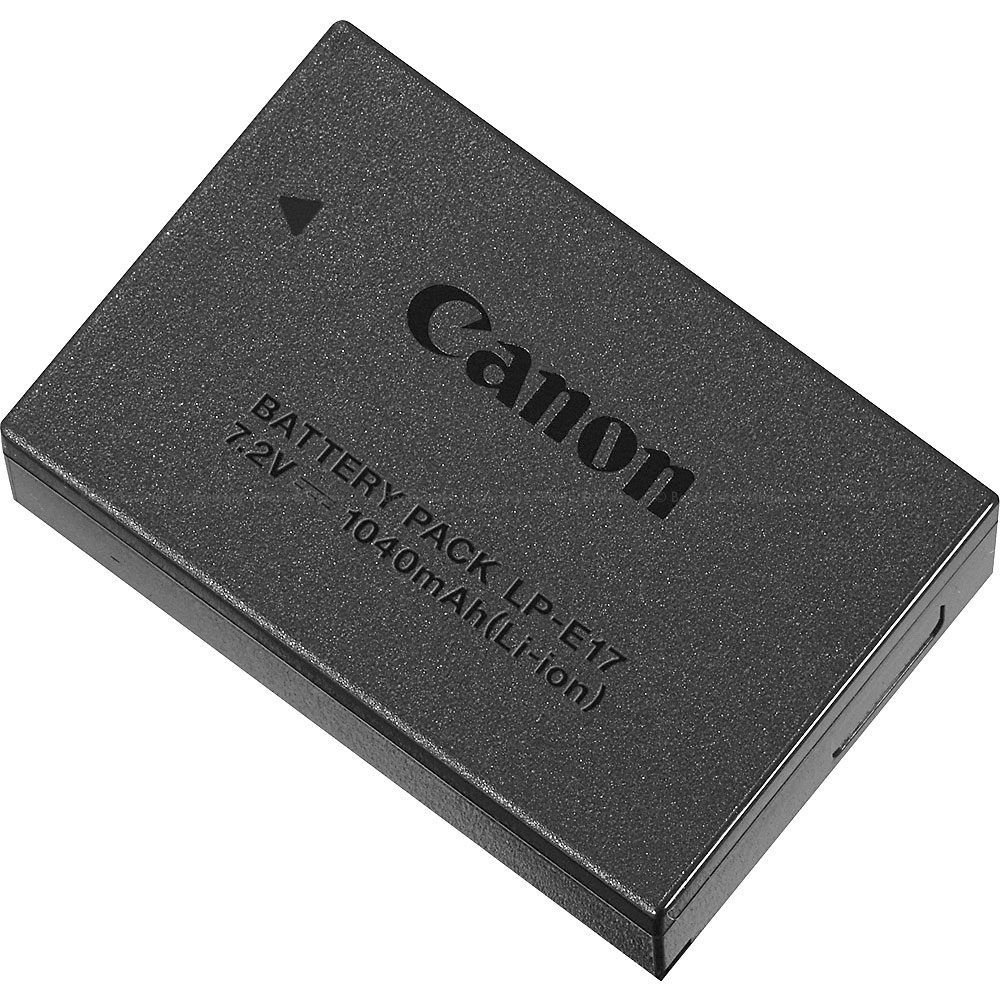
- Battery: (one) Canon LP-E17 battery pack • Canon Battery Charger LC-E17 (included)
- Optional Battery Grip: None
- Optional Extension Grip: EG-E2 Grip EX
- USB Charging: Canon USB Power Adapter PD-E2 or PD-E1 recommended (other USB power supplies cannot be guaranteed for proper operation)
- AC Power Supply: Canon DC Coupler DR-E18 and Canon AC Adapter AC-E6N • AC Adapter Kit ACK-E18 can also be used
- Number of shots available:
- Viewfinder shooting: Power Saving — 220 shots; Smooth — 150 shots
- LCD screen shooting: Power Saving — 340 shots; Smooth — 270 shots
- Based on CIPA test standards, at 73°F / 23°C
- Using new, fully-charged Canon LP-E17 battery pack
- Number of shots can vary greatly, depending on shooting conditions, etc.
- Video operating time:
- 4K Standard LGOP (59.94 / 50.00 FPS — approx. 40 min. available
- Full HD (29.97 / 25.00 FPS) — approx. 2 hr. 00 min.
- Movie playback time (4K at 59.94 / 50.00 FPS) — approx. 2 hr. 40 min.
- At 73°F / 23°C, using new, fully-charged Canon LP-E17 battery pack
Camera Body
- Dimensions W x H x D: 5.17 x 3.54 x 3.14 in. / 131.4 x 90.0 x 79.7mm
- Weight: Approx. 19.3 oz. / 1.2 lbs. / 546g • Body only, with battery and one SD card installed
- Operating Environment: 32°F – 104°F / 0°C – 40°C - Relative humidity 85% or less